Most “install Hermes Agent” walkthroughs stop at the point where the prompt answers you on your laptop. That is the least interesting part. An agent earns its keep when it runs while you sleep: persistent, reachable from your phone, fenced in by an explicit approvals policy, and incapable of silently burning your cloud budget.
This is a complete build pattern for deploying Hermes Agent by Nous Research onto an AWS EC2 instance with no inbound ports whatsoever, wiring it to Telegram as a private Hermes bot, scheduling cron workloads, and bolting on a filesystem-level kill switch. Everything is infrastructure-as-code. Names, regions, schedules and limits are shown as variables. Substitute your own, and don’t publish yours.
What is Hermes Agent?
Hermes Agent is an open-source, terminal-native AI agent from Nous Research, the lab behind the Hermes family of open-weight models. The project lives at nousresearch/hermes-agent on GitHub, and its documentation is published at hermes-agent.nousresearch.com.
Rather than being a chat window, the Hermes AI agent is a runtime: a Hermes CLI, a pluggable model provider layer, a messaging gateway (Telegram among others), a built-in cron scheduler, and a skills system. Think of it as a daemon with opinions about tool use, rather than an app. That architecture is precisely why it belongs on a server rather than a desktop.
Hermes desktop vs running Hermes on a server
A large share of people searching for Hermes desktop or Hermes Agent on Windows want a local install. That is fine for experimentation, but a laptop agent dies when the lid closes. For anything scheduled, such as monitoring, research or digests, you want a headless host with an always-on gateway.
The design goals:
- Zero ingress. No port 22, no port anything. The security group has no inbound rules at all.
- Reproducible. One Terraform file. Apply and destroy are the whole lifecycle.
- Cost-bounded. The instance runs only inside a scheduled window, and an AWS Budget alerts before you overspend.
- Operable from a phone. Telegram in, Telegram out.
- Revocable in one keystroke. A kill switch the service checks before it is allowed to start.
The architecture at a glance
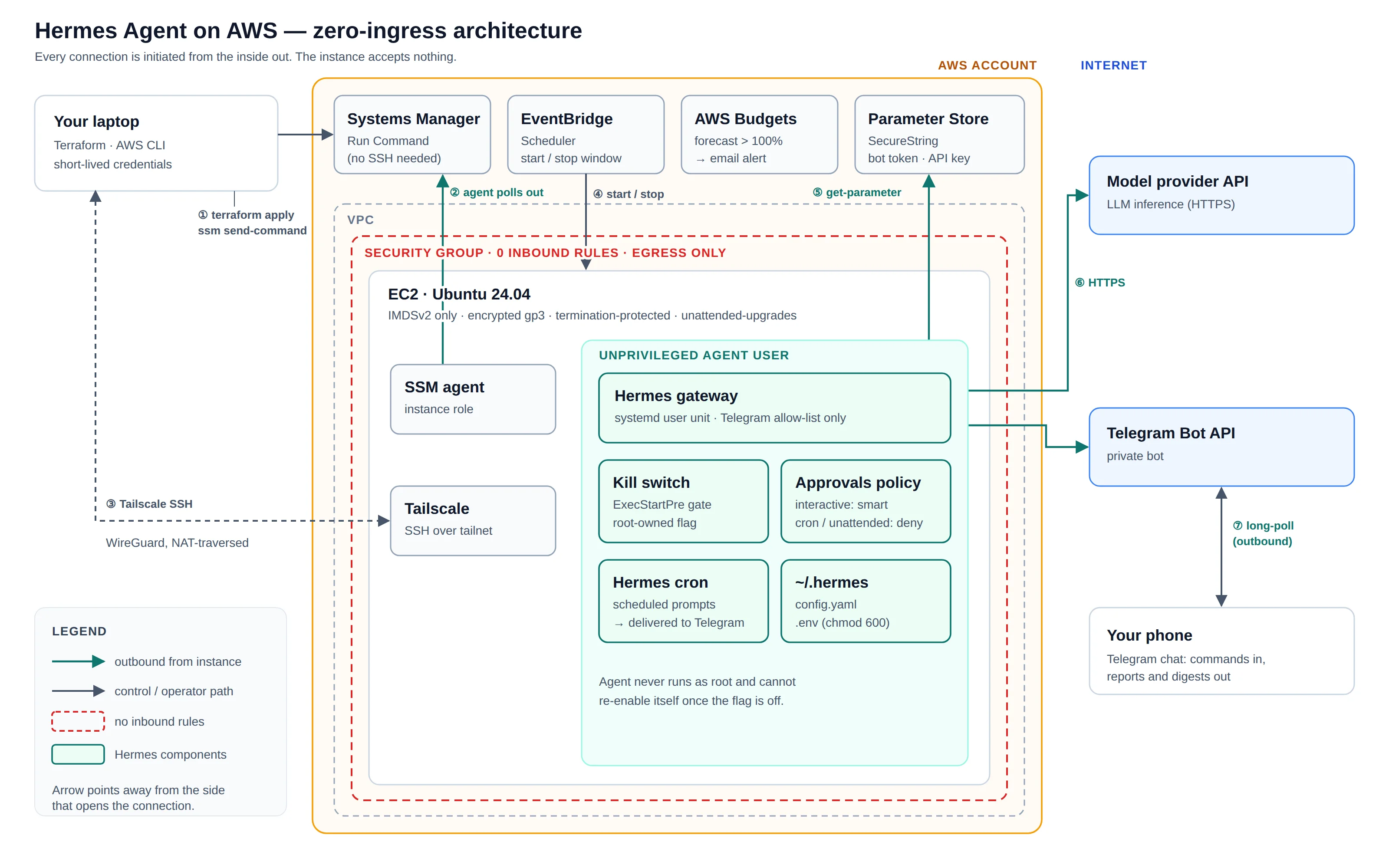
- Compute: a single EC2 instance on Ubuntu 24.04 with an encrypted gp3 root volume
- Access plane: AWS Systems Manager (SSM) Run Command plus Tailscale SSH, never a public SSH port
- Agent: Hermes Agent under a dedicated, unprivileged Linux user
- Interface: Telegram bot via the Hermes gateway, allow-listed to a single user ID
- Scheduling: EventBridge Scheduler starts and stops the instance on a fixed window
- Guardrails: Hermes approvals policy, a systemd kill switch, and a monthly cost budget
Step 1: Provisioning the Hermes host with Terraform
Everything lives in a single main.tf, driven by a handful of variables so nothing environment-specific is hardcoded:
variable "project"            { type = string }
variable "region"             { type = string }
variable "timezone"           { type = string }
variable "start_cron"         { type = string }
variable "stop_cron"          { type = string }
variable "monthly_budget_usd" { type = string }
variable "alert_email"        { type = string }

provider "aws" {
  region = var.region
  default_tags { tags = { project = var.project } }
}
Keep the real values in a terraform.tfvars that never leaves your machine. Add it to .gitignore alongside *.tfstate, which also contains resource details you shouldn’t share.
Never hardcode an AMI ID
AMI IDs rot. Instead, resolve Canonical’s current Ubuntu 24.04 image from the public SSM parameter AWS maintains:
data "aws_ssm_parameter" "ubuntu" {
  name = "/aws/service/canonical/ubuntu/server/24.04/stable/current/amd64/hvm/ebs-gp3/ami-id"
}
Every apply therefore lands on a patched base image with zero maintenance.
An instance role instead of an open port
The instance gets an IAM role carrying the AWS-managed policy AmazonSSMManagedInstanceCore, wrapped in an instance profile. That single attachment is what allows Systems Manager to execute commands on the host without any inbound connectivity. The SSM agent dials out.
The security group is deliberately austere:
resource "aws_security_group" "agent" {
  name   = "${var.project}-sg"
  vpc_id = data.aws_vpc.selected.id

  egress {
    from_port   = 0
    to_port     = 0
    protocol    = "-1"
    cidr_blocks = ["0.0.0.0/0"]
  }
  # No ingress block. At all.
}
A key pair is registered from a locally generated ed25519 key (ssh-keygen -t ed25519), kept purely as a break-glass fallback.
The instance itself
resource "aws_instance" "agent" {
  ami                     = data.aws_ssm_parameter.ubuntu.value
  instance_type           = var.instance_type
  iam_instance_profile    = aws_iam_instance_profile.agent.name
  vpc_security_group_ids  = [aws_security_group.agent.id]
  disable_api_termination = true
  disable_api_stop        = false

  root_block_device {
    volume_size = var.root_volume_gb
    volume_type = "gp3"
    encrypted   = true
  }

  metadata_options {
    http_tokens = "required" # IMDSv2 only
  }
}
Two details matter here. IMDSv2 is mandatory, which neutralises the classic SSRF-to-credentials attack path. And termination protection is on while stop is allowed: the scheduler must be able to stop the box, but nothing should be able to delete it by accident.
A scheduled window with EventBridge Scheduler
The agent only needs to be awake while its jobs run. An IAM role trusted by scheduler.amazonaws.com gets ec2:StartInstances and ec2:StopInstances, scoped to this one instance ARN, not *. Two schedules use EventBridge’s universal SDK targets, so no Lambda glue is required:
resource "aws_scheduler_schedule" "start" {
  name                         = "${var.project}-start"
  schedule_expression          = var.start_cron   # e.g. "cron(0 9 ? * MON-FRI *)"
  schedule_expression_timezone = var.timezone
  flexible_time_window { mode = "OFF" }

  target {
    arn      = "arn:aws:scheduler:::aws-sdk:ec2:startInstances"
    role_arn = aws_iam_role.scheduler.arn
    input    = jsonencode({ InstanceIds = [aws_instance.agent.id] })
  }
}
# The stop schedule is identical, with var.stop_cron and ec2:stopInstances
A budget tripwire
resource "aws_budgets_budget" "agent" {
  budget_type  = "COST"
  limit_amount = var.monthly_budget_usd
  limit_unit   = "USD"
  time_unit    = "MONTHLY"
  # Two notifications: ACTUAL > 100% and FORECASTED > 100%, to var.alert_email
}
The forecasted alert is the valuable one: it fires before the money is spent.
Apply and verify
Use short-lived credentials from a named profile (AWS IAM Identity Center is ideal) rather than long-lived keys in a dotfile:
export AWS_PROFILE=<your-profile>
terraform init
terraform validate
terraform plan
terraform apply
Then verify every assumption instead of trusting the plan:
aws ec2 describe-instances
aws ec2 describe-security-groups        # IpPermissions: []  <- proof of zero ingress
aws ssm describe-instance-information   # PingStatus: Online
aws scheduler list-schedules
aws budgets describe-budgets
Step 2: Operating the box without SSH (SSM Run Command)
Install the AWS CLI (uv tool install awscli works well). On my machine the Session Manager plugin refused to install, which removed the interactive shell option entirely. So every server-side step ran through SSM Run Command, which turned out to be a cleaner, more auditable workflow.
The pattern, repeated for each step:
PARAMS=$(python3 -c 'import json,sys; print(json.dumps({"commands":[sys.stdin.read()]}))' < step.sh)

CMD_ID=$(aws ssm send-command \
  --instance-ids "$INSTANCE_ID" \
  --document-name AWS-RunShellScript \
  --parameters "$PARAMS" \
  --query Command.CommandId --output text)

aws ssm get-command-invocation \
  --command-id "$CMD_ID" --instance-id "$INSTANCE_ID" \
  --query '[Status,StandardOutputContent]'
Serialising the script through Python’s json.dumps is the trick that makes nested quoting survive the trip intact. Poll until Success, read StandardOutputContent, move on.
Security note. Run Command parameters and output are retained in SSM command history and recorded in CloudTrail. Never inline API keys or bot tokens into a command. Store them as SSM Parameter Store SecureString values and have the script fetch them on the host with aws ssm get-parameter --with-decryption. Grant the instance role ssm:GetParameter on those paths only.
Step 3: Hardening the Ubuntu host
Baseline packages and automatic security patching:
apt-get update && apt-get -y upgrade
apt-get -y install curl git unzip jq python3 python3-venv build-essential unattended-upgrades
SSH is tightened even though it is not publicly reachable. Defence in depth:
sed -i 's/^#\?PasswordAuthentication.*/PasswordAuthentication no/' /etc/ssh/sshd_config
sed -i 's/^#\?PermitRootLogin.*/PermitRootLogin prohibit-password/' /etc/ssh/sshd_config
systemctl restart ssh
For an interactive path that still needs no open port, join the host to a Tailscale tailnet:
curl -fsSL https://tailscale.com/install.sh | sh
nohup tailscale up --ssh --hostname <node-name> > /tmp/ts.log 2>&1 &
With no terminal to click through, pull the login URL from the log, authorise it once from your browser, and the node joins your tailnet. Restrict who can reach it with tailnet ACLs. Finally, set the host timezone (timedatectl set-timezone <Your/Zone>) so cron expressions read natively in local time.
Step 4: How to install Hermes Agent, the headless way
Dedicated user, official installer
The agent never runs as root:
useradd -m -s /bin/bash <agent-user>
sudo -u <agent-user> -i bash -c 'curl -fsSL https://hermes-agent.nousresearch.com/install.sh | bash'
That is the official Hermes Agent install one-liner. There is an equivalent script at raw.githubusercontent.com/nousresearch/hermes-agent/main/scripts/install.sh. It creates ~/.hermes, a self-contained Python runtime, and the hermes binary in ~/.local/bin, then prints setup skipped, no terminal, because the interactive wizard needs a TTY.
Configuration as code instead of the wizard
Rather than fight the wizard, edit the configuration files directly with a short script that pulls secrets from Parameter Store. The keys that matter in ~/.hermes/.env:
TELEGRAM_BOT_TOKEN=<from SecureString>
TELEGRAM_ALLOWED_USERS=<your numeric id>
TELEGRAM_HOME_CHANNEL=<channel>
TELEGRAM_HOME_CHANNEL_NAME=<name>
GATEWAY_ALLOW_ALL_USERS=false
AI_GATEWAY_API_KEY=<from SecureString>
GATEWAY_ALLOW_ALL_USERS=false combined with an explicit allow-list is non-negotiable. An agent with shell access behind a public bot handle is an open invitation.
In config.yaml, set your model provider and append an approvals policy:
model:
  provider: <provider>
  default: <model>

approvals:
  mode: smart
  cron_mode: deny
  unattended_mode: deny
  single_query_mode: deny
This is the most important block in the whole deployment. Interactive sessions get smart approvals. Anything running unattended, cron jobs above all, is denied privileged actions by default. The agent can research and report on a schedule. It cannot decide to reconfigure the server on a schedule.
Then lock the secrets file down:
chown <agent-user>:<agent-user> ~/.hermes/.env && chmod 600 ~/.hermes/.envHeadless model authentication
setsid nohup hermes auth add <provider> --no-browser > auth.log 2>&1 &Read the device URL and code out of the log, approve the login on your phone, confirm with hermes auth status <provider>, and delete the log afterwards.
Smoke test
hermes -z "Reply with exactly: HERMES OK"
# HERMES OK
Deterministic prompt, deterministic assertion. If this fails, nothing downstream matters.
Want your AI agent infrastructure and your workflows automated too? I build and harden agent infrastructure on AWS, and automate the workflows around it: provisioning, scheduled jobs, approvals, kill switches and cost controls. Thirty minutes, no charge. You describe the setup and I tell you what I would change. Also covers self-hosted AI agent deployments.
Book a consultation callStep 5: Turning Hermes into a private Telegram bot
- Create the bot with @BotFather and copy the token.
- Verify the token before Hermes ever sees it:
curl -s "https://api.telegram.org/bot$TOKEN/getMe"- Read your numeric user ID directly: send the bot any message, then query updates. No third-party “ID bot” needed.
curl -s "https://api.telegram.org/bot$TOKEN/getUpdates" | jq '.result[0].message.from.id'- Round-trip a sendMessage from your laptop to prove end-to-end delivery.
Isolating each layer this way means that when something breaks later, you already know it is not the token.
Step 6: The Hermes gateway as a systemd service, with a kill switch
Make the user’s services survive logout, then let Hermes install its own unit:
loginctl enable-linger <agent-user>
hermes gateway install   # creates ~/.config/systemd/user/hermes-gateway.service
A kill switch the service must pass before it starts
Create a root-owned flag file somewhere the agent user cannot write, set it to 1, and write a tiny gate script that exits non-zero unless the flag reads 1. Then wire it in with a systemd drop-in:
# ~/.config/systemd/user/hermes-gateway.service.d/killswitch.conf
[Service]
ExecStartPre=/path/to/your-gate-script
systemctl --user daemon-reload
systemctl --user restart hermes-gateway
systemctl --user status hermes-gateway # active (running)Because the flag is root-owned, the agent cannot re-enable itself. Flipping it to 0 and restarting the unit is a hard stop that also survives reboots and the scheduled start.
First sign of life:
hermes send -t telegram "Hermes is live..."The gateway log reports it is connected to Telegram in polling mode. That is outbound long-polling, which is exactly why no inbound port is needed.
Step 7: Scheduling work with Hermes cron
The payoff. A recurring research digest, delivered straight to Telegram:
hermes cron create "<cron expression>" "<your prompt>" --name <job-name> --deliver telegramHermes returns a job ID and the next run time. Test it immediately rather than waiting for the schedule:
hermes cron run <job-id>
hermes cron runs           # status: completed, delivered to chat
hermes cron pause <job-id> # when you want it quiet
Align the EventBridge window around your Hermes cron times: boot shortly before the first job, stop after the last. You pay for the hours the agent actually works, not twenty-four.
Step 8: Pulling files back past the 24 KB Run Command limit
SSM Run Command truncates output at roughly 24 KB. Small files are trivial: gzip | base64 on the host, decode locally. Larger ones (my config.yaml was well over 100 KB) need slicing:
# on the host
gzip -c config.yaml | base64 -w0 > /tmp/cfg.b64
cut -c1-20000 /tmp/cfg.b64        # slice 1
cut -c20001-40000 /tmp/cfg.b64    # slice 2, and so on
Fetch each slice via Run Command, concatenate locally, base64 -d | gunzip, and delete the temporary file on the host. Only do this for non-secret files: anything that passes through Run Command output is retained. For reading the internals, simply clone the Hermes Agent GitHub repo read-only with git clone --depth 1.
Hermes setup gotcha: the script that killed itself
One failure cost me two attempts and is worth internalising. I ran a Run Command script containing pkill -f <pattern> to restart a process. pkill -f matches against the full command line, and the script’s own command line contained that pattern. It killed itself. Exit code 143, which is 128 plus SIGTERM 15.
The fix is to make the pattern not match itself, for example pkill -f '[h]ermes gateway', or better, let systemd own the lifecycle.
How to uninstall Hermes Agent and tear it all down
Because the whole stack is declarative, teardown is clean:
- Flip the kill switch and run
systemctl --user stop hermes-gateway. The agent goes dark instantly. - Pause or delete any Hermes cron jobs.
- Remove the agent user and its home directory (
userdel -r <agent-user>) to purge~/.hermes, credentials included. - Revoke the Telegram bot token via @BotFather, rotate the model API key, and remove the node from Tailscale.
- Set
disable_api_termination = false, runterraform apply, thenterraform destroy.
Step 5’s ordering matters: termination protection will otherwise make destroy fail, which is exactly what it is for.
Frequently asked questions
- What is Hermes Agent?
- An open-source AI agent runtime from Nous Research, with a CLI, a messaging gateway, cron scheduling, skills, and a pluggable model provider.
- Where is the Hermes Agent GitHub repo?
- github.com/nousresearch/hermes-agent. The docs and install script live at hermes-agent.nousresearch.com.
- Can I install Hermes Agent without a terminal wizard?
- Yes. Run the installer, then write .env and config.yaml directly, and use --no-browser for provider authentication.
- Does the Hermes Telegram bot need an open port?
- No. The gateway uses outbound long-polling, so a zero-ingress security group works.
- How much does this cost?
- A mid-size instance billed only for its scheduled window, plus a small gp3 volume, and a forecast-based budget alarm tells you well before you drift.
Closing thoughts
The installer is one line. The engineering is everything around it: an access plane with no attack surface, credentials scoped to a single resource, secrets that never transit a logged channel, an approvals policy that treats unattended execution as untrusted, a kill switch the agent cannot override, and a cost ceiling that alerts on forecast rather than hindsight.
Autonomous agents are only as trustworthy as the envelope you deploy them into. Build the envelope first.